
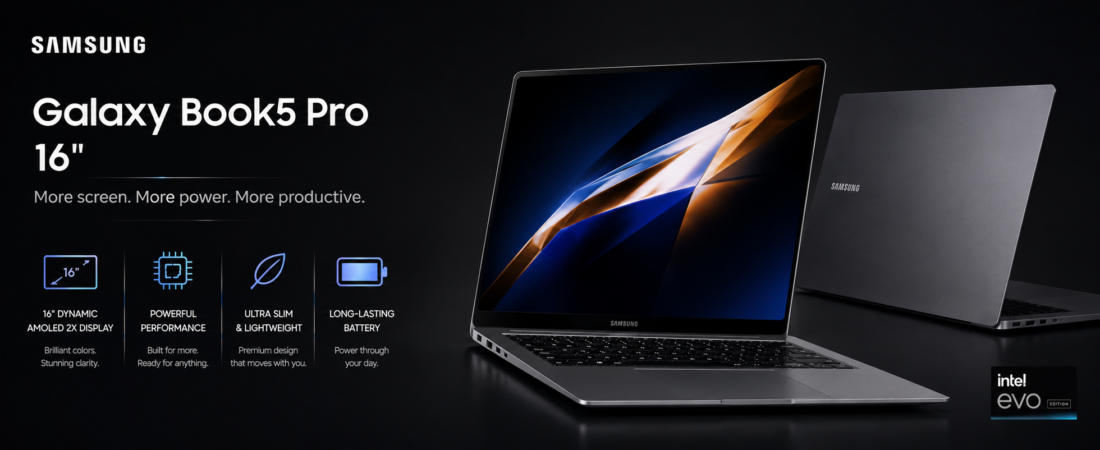
The Samsung Galaxy Book5 Pro 360 doesn’t compromise in the obvious places most convertibles do. The hinge is solid, tablet mode is a first-class experience, and the screen is genuinely good enough to justify switching between modes throughout the day.
Released in early 2025 at $1,549, it runs on Intel’s Lunar Lake architecture (Core Ultra 7 258V), ships with 32 GB LPDDR5X as standard across every configuration, includes a built-in S Pen, and puts a 16-inch 3K Dynamic AMOLED 2X 120Hz touchscreen on a 360-degree hinge that holds position confidently in every mode. It’s a Copilot+ PC — Windows AI features like Recall, Live Captions, and Cocreator run on top of Galaxy AI’s own layer.
Here’s what we’ll cover:
- Galaxy Book5 Pro 360 full specs
- What works and what doesn’t
- How it compares to the competition
- Our verdict
Samsung Galaxy Book5 Pro 360 Specs at a Glance
 Display Dynamic AMOLED 2X 16″ · 120Hz 2880×1800 (3K) · 600 nits · touch 360° convertible · S Pen included 
|
 Processor Intel Core Ultra 7 258V (Lunar Lake) Intel Arc 140V · 48 TOPS NPU 32 GB LPDDR5X — all configs
|
 Camera & Audio 3 MP IR camera · Windows Hello Quad-speaker AKG · Dolby Atmos Studio-quality 3-mic array 
|
 Battery & Connectivity 76Wh · up to 22 hours · USB-C 65W Thunderbolt 4 · USB-A · HDMI 2.0 Wi-Fi 6E · Bluetooth 5.3
|
 Storage 512 GB / 1 TB NVMe SSD Gray · Sapphire Blue 1.65 kg · 12.6mm thin
|
OS & Software Windows 11 Home · Copilot+ PC Galaxy AI · S Pen · Samsung DeX Live Translate · Circle to Search
|
What We Like
- Lunar Lake changed the efficiency picture for Intel ultrabooks in a real way. Under mixed loads — documents, calls, browser with a dozen tabs, some Spotify — the Book5 Pro 360 regularly gets 12 to 14 hours. That’s not claimed battery life; that’s what happens in actual use
- 32 GB standard is the right call, and Samsung deserves credit for making it the floor instead of an upgrade. AI apps are memory-hungry and getting more so. Buying 16 GB in 2025 feels like a short-term decision
- The S Pen being in the box matters more than it sounds. Taking a note in a meeting, annotating a PDF, signing a document — you do these without thinking about whether you have the right accessory. That ease of access changes behavior
- The 360-degree hinge is properly engineered. It holds position without wobble in tent mode, opens smoothly one-handed in laptop mode, and doesn’t creak. Cheap convertibles fail this test. The Book5 Pro 360 passes it
- Copilot+ AI features on top of Galaxy AI gives this more software capability than any competing convertible at this price. Whether you use all of it depends on your workflow, but having both layers available is a stronger position than either alone
What Could Be Better
- Windows 11 in tablet mode is still Windows 11 in tablet mode. Touch targets, app scaling, and multitasking gestures have improved but they haven’t caught iPadOS. If your primary reason for a convertible is genuine tablet use, set expectations accordingly
- The Intel Arc 140V GPU is fine for everyday work and handles light creative tasks, but it runs out of headroom quickly under sustained GPU load. Final Cut-level video work isn’t this machine’s calling
- Samsung’s first-boot software situation is unchanged — there’s a pile of apps and trials waiting. Set aside 20 minutes to deal with it before your first real workday
- The jump in price between the 512 GB and 1 TB configurations is steeper than it should be for a machine at this tier
How It Compares
| Laptop | Display | RAM Standard | Pen Included | Battery | Price |
|---|---|---|---|---|---|
| Samsung Galaxy Book5 Pro 360 | AMOLED 16″ 3K 120Hz touch | 32 GB LPDDR5X | Yes (S Pen) | ~22 hrs | $1,549 |
| HP Spectre x360 16 | OLED 16″ 120Hz touch | 16 GB | No | ~17 hrs | $1,699 |
| Lenovo Yoga 9i 2-in-1 (2025) | OLED 14″ 120Hz touch | 32 GB | No | ~14 hrs | $1,499 |
| Microsoft Surface Pro 11 | LCD 13″ 120Hz touch | 16 GB | No (separate) | ~14 hrs | $1,199 |
Category Winners
| Category | Winner |
|---|---|
| Display quality | Samsung Galaxy Book5 Pro 360 |
| RAM at standard config | Book5 Pro 360 / Yoga 9i (tie) |
| Pen included | Samsung Galaxy Book5 Pro 360 |
| Battery life | Samsung Galaxy Book5 Pro 360 |
| AI features depth | Samsung Galaxy Book5 Pro 360 |
| Portability | Lenovo Yoga 9i (14″) |
| Starting price | Microsoft Surface Pro 11 |
Final Scores
| Laptop | Rating |
|---|---|
| Samsung Galaxy Book5 Pro 360 |  |
| HP Spectre x360 16 | |
| Lenovo Yoga 9i 2-in-1 | |
| Microsoft Surface Pro 11 | |
Should You Buy the Samsung Galaxy Book5 Pro 360?
The Book5 Pro 360 is the best Windows convertible Samsung has shipped. The combination of a 16-inch AMOLED touchscreen, Lunar Lake battery efficiency, 32 GB standard memory, and an included S Pen is hard to match at $1,549 — especially when HP charges $1,699 for less RAM and a smaller screen on its competing Spectre.
Where it stumbles is predictable: Windows tablet mode, GPU ceiling, and first-boot software clutter. None of those are dealbreakers for the professional audience this machine targets. If you’re a Galaxy phone user who wants seamless continuity between devices, or you genuinely rotate between laptop and tablet modes during a workday — this is the machine built for you.