
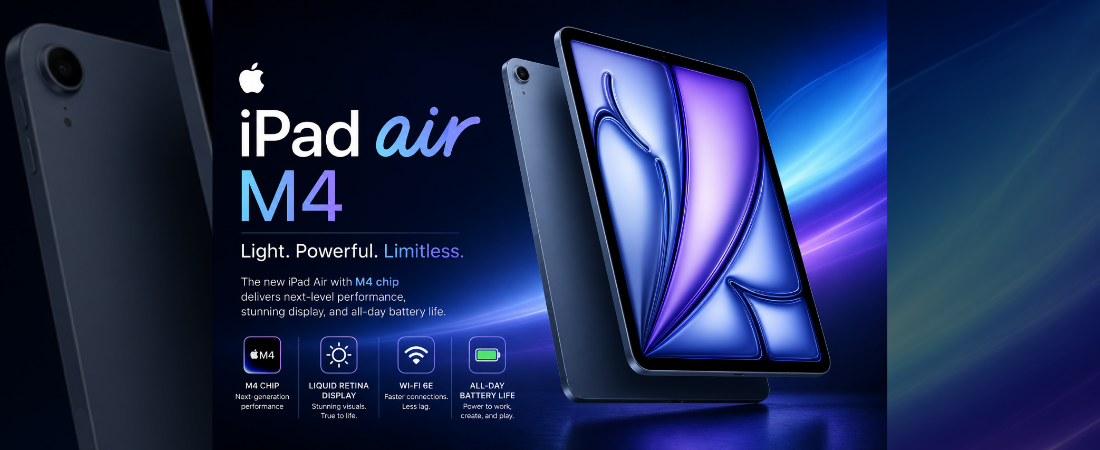
The Apple iPad Air 11-inch (M4) is Apple’s answer to a simple question: how much iPad do you really need?
Released on March 11, 2026, it brings the same M4 chip found in the iPad Pro lineup, 12GB of unified memory, Wi-Fi 7, Bluetooth 6, Apple Intelligence, and iPadOS 26 — all starting at $599. The design is unchanged from last year’s M3 model, and the display is still an LCD Liquid Retina panel rather than OLED. But the performance leap is real, and for students, creatives, and everyday users who want the best balance of power and price in the Apple ecosystem, this remains the one to get.
Here’s what we’ll cover:
- iPad Air 11-inch (M4) full specs
- What we love — and what we don’t
- How it stacks up against the competition
- Our final verdict
iPad Air 11-inch (M4) Specs at a Glance
 Display Liquid Retina LCD 11″ 2360×1640 · 264 PPI · True Tone · P3 60Hz · anti-reflective coating  
|
 Processor Apple M4 · 8-core CPU · 9-core GPU 16-core Neural Engine · 12 GB unified memory Apple Intelligence built-in
|
 Battery Life 28.93 Wh · up to 10 hours USB-C fast charging · 20W included Wi-Fi 7 · optional 5G
|
 Storage 128 GB / 256 GB / 512 GB / 1 TB no microSD expansion USB-C · USB 3 speeds
|
 Accessories Apple Pencil Pro support Magic Keyboard for iPad Air landscape front camera · Center Stage
|
OS & Productivity iPadOS 26 · Apple Intelligence Stage Manager · flexible windowing years of guaranteed updates
|
What We Like
- The M4 chip is in a different league from every Android tablet in this price range — video editing, 3D rendering, AI workloads, and heavy multitasking all run effortlessly, and this iPad will stay relevant for years to come
- 12GB of unified memory is a meaningful upgrade over the M3’s 8GB — Apple Intelligence features run smoother, and demanding apps stay loaded in the background without interruption
- Apple Pencil Pro support brings tilt, squeeze, and hover detection — the most precise and responsive stylus experience available on any tablet right now
- The Magic Keyboard transforms this into a genuinely capable laptop replacement, with a glass trackpad and full-size keys that make real work feel natural
- Wi-Fi 7 and Bluetooth 6 are the fastest wireless standards available — future-proofing connectivity well ahead of most competitors
- iPadOS 26 with Stage Manager and flexible windowing has matured into a serious productivity platform — multitasking finally feels as capable as a laptop
- At 464g and 6.1mm thin, it remains one of the most portable full-size tablets available anywhere
What Could Be Better
- Still an LCD display — beautiful and accurate, but no true blacks, lower contrast, and noticeably less visual impact compared to the Samsung Galaxy Tab S10 FE’s AMOLED panel
- 60Hz refresh rate in 2026 is a real limitation — scrolling and animations feel less fluid than tablets running 90Hz or 120Hz at similar or lower price points
- The accessories that make this truly shine — Apple Pencil Pro ($129) and Magic Keyboard ($269) — are sold separately and add nearly $400 to the total cost
- No design changes from the M3 model — existing M3 owners have almost no reason to upgrade
- The included 20W charger is slow for a $599 device — Samsung and Microsoft ship faster adapters at comparable prices
- No microSD expansion and no headphone jack remain persistent frustrations for users migrating from Android tablets
How It Compares
| Tablet | Display | Processor | Battery / Charging | Stylus Support | Starting Price |
|---|---|---|---|---|---|
| iPad Air 11″ (M4) | LCD 11″ 60Hz · 2360×1640 · P3 · True Tone | Apple M4 · 12 GB | 28.93 Wh · 10h · 20W | Apple Pencil Pro (sold separately) | $599 |
| Samsung Galaxy Tab S10 FE | AMOLED 10.9″ 90Hz · 2304×1440 · Vision Booster | Exynos 1580 · 8 GB | 8,000 mAh · 12h · 45W | S Pen included in box | $499 |
| Google Pixel Tablet | LCD 10.95″ 60Hz · 2560×1600 | Google Tensor G2 · 8 GB | 7,020 mAh · 12h · 18W | USI 2.0 stylus (third-party) | $499 |
| Microsoft Surface Pro 11 | OLED 13″ 120Hz · 2880×1920 | Snapdragon X Plus · 16 GB | 53 Wh · 14h · 65W | Surface Slim Pen 2 (sold separately) | $999 |
Category Winners
| Category | Winner |
|---|---|
| Processor performance | iPad Air 11″ (M4) |
| Display quality & contrast | Microsoft Surface Pro 11 |
| Display refresh rate | Microsoft Surface Pro 11 |
| Battery capacity | Samsung Galaxy Tab S10 FE |
| Charging speed | Microsoft Surface Pro 11 |
| Stylus value | Samsung Galaxy Tab S10 FE (S Pen included) |
| Stylus precision | iPad Air 11″ (M4) with Apple Pencil Pro |
| Keyboard experience | Microsoft Surface Pro 11 |
| Software ecosystem | iPad Air 11″ (M4) |
| Portability & design | iPad Air 11″ (M4) |
| Value for money | Samsung Galaxy Tab S10 FE |
Final Scores
| Tablet | Rating |
|---|---|
| Apple iPad Air 11″ (M4) |  |
| Microsoft Surface Pro 11 | |
| Samsung Galaxy Tab S10 FE | |
| Google Pixel Tablet | |
Should You Buy the iPad Air 11-inch (M4)?
The iPad Air 11-inch (M4) is the best all-around tablet for most people in 2026 — and it isn’t particularly close when you factor in the full picture. The M4 chip delivers performance that will stay relevant well into the decade, Apple Pencil Pro and Magic Keyboard support transform it into a genuine laptop alternative, and iPadOS 26 has finally matured into a serious productivity platform.
The honest trade-offs are the LCD display, 60Hz refresh rate, and the real cost of the full experience once you add accessories. If display quality is your top priority, the Samsung Galaxy Tab S10 FE’s AMOLED panel offers better contrast at $100 less — and includes an S Pen in the box. If you need a full Windows experience, the Surface Pro 11 is the more complete professional tool, at a significantly higher price.
But for students, creatives, and everyday users who want the most capable, portable, and future-proof tablet under $700 — one that gets better with every iPadOS update — the iPad Air M4 earns its spot at the top of the list.