
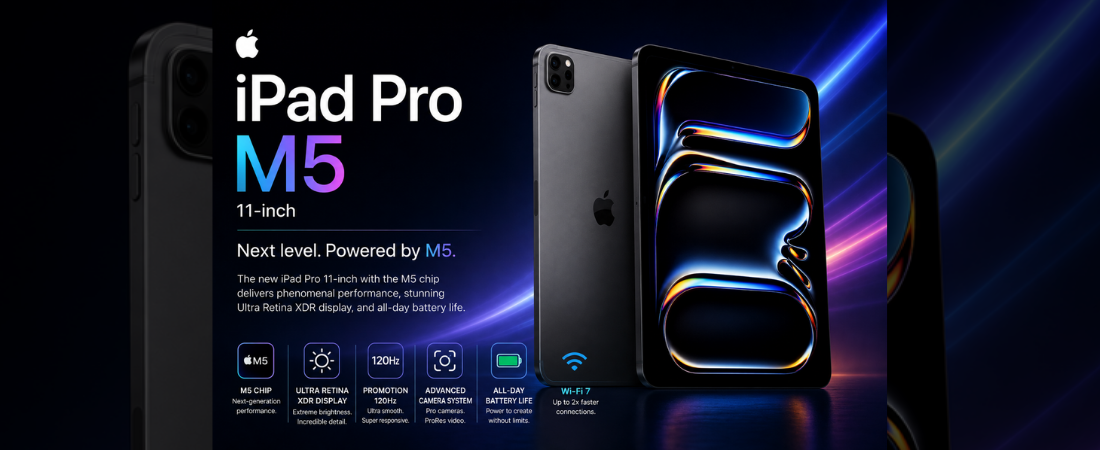
The Apple iPad Pro 11-inch (M5) doesn’t compete with other tablets. It competes with laptops.
Released on October 22, 2025, it arrives with the M5 chip, a stunning tandem OLED Ultra Retina XDR display with ProMotion 120Hz, 12GB of unified memory, Thunderbolt connectivity, LiDAR scanner, Wi-Fi 7, and fast charging capable of hitting 50% in just 30 minutes — all starting at $999. The design is unchanged from the M4 generation, and the upgrade won’t turn heads on paper. But under the hood, this is the most capable 11-inch tablet ever made — and for creative professionals, power users, and anyone who needs a laptop alternative that fits in a bag, it sets a standard nothing else touches.
Here’s what we’ll cover:
- iPad Pro 11-inch (M5) full specs
- What we love — and what we don’t
- How it stacks up against the competition
- Our final verdict
iPad Pro 11-inch (M5) Specs at a Glance
 Display Tandem OLED 11″ · Ultra Retina XDR 2420×1668 · ProMotion 120Hz · 1000 nits True Tone · P3 · nano-texture option 
|
 Processor Apple M5 · 9-core CPU · 10-core GPU 16-core Neural Engine · 12 GB unified memory Apple Intelligence · LiDAR scanner
|
 Battery & Charging 31.29 Wh · up to 10 hours Fast charge: 50% in ~30 min Thunderbolt 4 · Wi-Fi 7 · 5G 
|
 Storage 256 GB / 512 GB / 1 TB / 2 TB Thunderbolt 4 transfer speeds no microSD expansion 
|
 Accessories Apple Pencil Pro · hover detection Magic Keyboard with trackpad landscape TrueDepth front camera
|
OS & Productivity iPadOS 26 · Apple Intelligence Stage Manager · flexible windowing years of guaranteed software updates
|
What We Like
- The tandem OLED Ultra Retina XDR display is the best screen on any tablet — period. True blacks, exceptional contrast, ProMotion 120Hz, and 1000 nits of full-screen brightness make everything from photo editing to movie watching genuinely breathtaking
- The M5 chip handles professional-grade workloads — 4K and 8K video editing, 3D rendering, complex AI tasks — without breaking a sweat. This is laptop-class performance in an 11-inch package weighing just 444g
- Thunderbolt 4 connectivity enables external display output, high-speed storage, and docking setups that turn this into a full desktop workstation when needed
- Fast charging to 50% in around 30 minutes is genuinely useful for professionals who can’t afford downtime between sessions
- The LiDAR scanner enables instant AR placement, precise depth mapping, and advanced camera features that no competing tablet offers at any price
- Apple Pencil Pro with hover detection and squeeze gestures remains the most precise and responsive stylus experience available on any device
- iPadOS 26 with Stage Manager, flexible windowing, and Apple Intelligence has finally matured into a system that can handle real professional workflows without frustration
- At just 5.1mm thin and 444g, it’s almost implausibly portable for a device this powerful
What Could Be Better
- The upgrade from the M4 iPad Pro is real but incremental — if you own last year’s model, there is genuinely little reason to upgrade
- The full professional experience requires significant additional spending — Apple Pencil Pro ($129) and Magic Keyboard ($299) add $428 on top of an already $999 starting price
- Nano-texture glass — a genuinely useful anti-glare upgrade — is locked to 1TB and 2TB models only, pushing the real cost well past $1,599
- iPadOS still has limitations compared to macOS or Windows for certain professional tasks — running full desktop applications or using multiple windows freely still has constraints
- Base storage starts at 256GB — fine for most users, but no microSD expansion means you’ll need to plan ahead or pay significantly more for higher storage tiers
- At $999, the price gap over the iPad Air M4 ($599) is substantial — and for many users, the Air covers 90% of the same ground for $400 less
How It Compares
| Tablet | Display | Processor | Battery / Charging | Stylus Support | Starting Price |
|---|---|---|---|---|---|
| iPad Pro 11″ (M5) | Tandem OLED 11″ 120Hz · 2420×1668 · XDR | Apple M5 · 12 GB unified | 31.29 Wh · 10h · 50% in 30 min | Apple Pencil Pro (sold separately) | $999 |
| Microsoft Surface Pro 11 | OLED 13″ 120Hz · 2880×1920 | Snapdragon X Plus · 16 GB | 53 Wh · 14h · 65W | Surface Slim Pen 2 (sold separately) | $999 |
| Samsung Galaxy Tab S10+ | Dynamic AMOLED 12.4″ 120Hz · 2800×1752 | Snapdragon 8 Gen 3 · 12 GB | 10,090 mAh · 12h · 45W | S Pen included in box | $999 |
| Lenovo Tab Extreme | AMOLED 14.5″ 120Hz · 3000×1876 | MediaTek Dimensity 9000 · 12 GB | 12,300 mAh · 16h · 68W | Lenovo Precision Pen 3 (sold separately) | $899 |
Category Winners
| Category | Winner |
|---|---|
| Display quality | iPad Pro 11″ (M5) |
| Display refresh rate | iPad Pro 11″ (M5) / Surface Pro 11 / Tab S10+ (tie — all 120Hz) |
| Processor performance | iPad Pro 11″ (M5) |
| Battery capacity | Lenovo Tab Extreme |
| Battery life | Lenovo Tab Extreme |
| Charging speed | Microsoft Surface Pro 11 |
| Stylus value | Samsung Galaxy Tab S10+ (S Pen included) |
| Stylus precision | iPad Pro 11″ (M5) with Apple Pencil Pro |
| Portability & design | iPad Pro 11″ (M5) |
| Professional connectivity | iPad Pro 11″ (M5) — Thunderbolt 4 |
| Software flexibility | Microsoft Surface Pro 11 — full Windows 11 |
| Software ecosystem | iPad Pro 11″ (M5) |
| Value for money | Lenovo Tab Extreme |
Final Scores
| Tablet | Rating |
|---|---|
| Apple iPad Pro 11″ (M5) | |
| Microsoft Surface Pro 11 | |
| Samsung Galaxy Tab S10+ | |
| Lenovo Tab Extreme | |
Should You Buy the iPad Pro 11-inch (M5)?
The iPad Pro 11-inch (M5) is the best tablet Apple has ever made — and by most objective measures, the best portable computing device available at this size and weight. The tandem OLED display is simply stunning, the M5 chip handles professional workloads that would challenge many laptops, Thunderbolt 4 opens up a full desktop ecosystem, and iPadOS 26 has finally grown into a platform that matches the hardware’s ambition.
The honest question isn’t whether it’s good — it clearly is. The question is whether it’s right for you. If you own an M4 iPad Pro, the upgrade is hard to justify. If you’re comparing it to the iPad Air M4, the $400 premium buys you OLED, 120Hz, LiDAR, Thunderbolt, and the M5 chip — meaningful advantages for professionals, but potentially overkill for students and casual users. And if you need full desktop software flexibility, the Microsoft Surface Pro 11 with Windows 11 remains the more complete professional tool.
But for video editors, illustrators, musicians, architects, and anyone who needs the absolute best portable creative workstation in a tablet form — nothing else comes close.